
You started with a notebook and a phone. Then a spreadsheet. Then a whiteboard for scheduling. Now you've got sticky notes on your monitor, lead sheets in a folder, customer info in three different places, and a nagging feeling that something important is falling through the cracks.
Last week, a customer called angry because no one showed up for their appointment—except someone did show up, just on the wrong day. Yesterday, you realized you never followed up on a $15,000 estimate from three weeks ago. This morning, a technician asked about a customer's history and you couldn't find the records.
These aren't isolated incidents. They're symptoms. And they're costing you money, customers, and sanity.
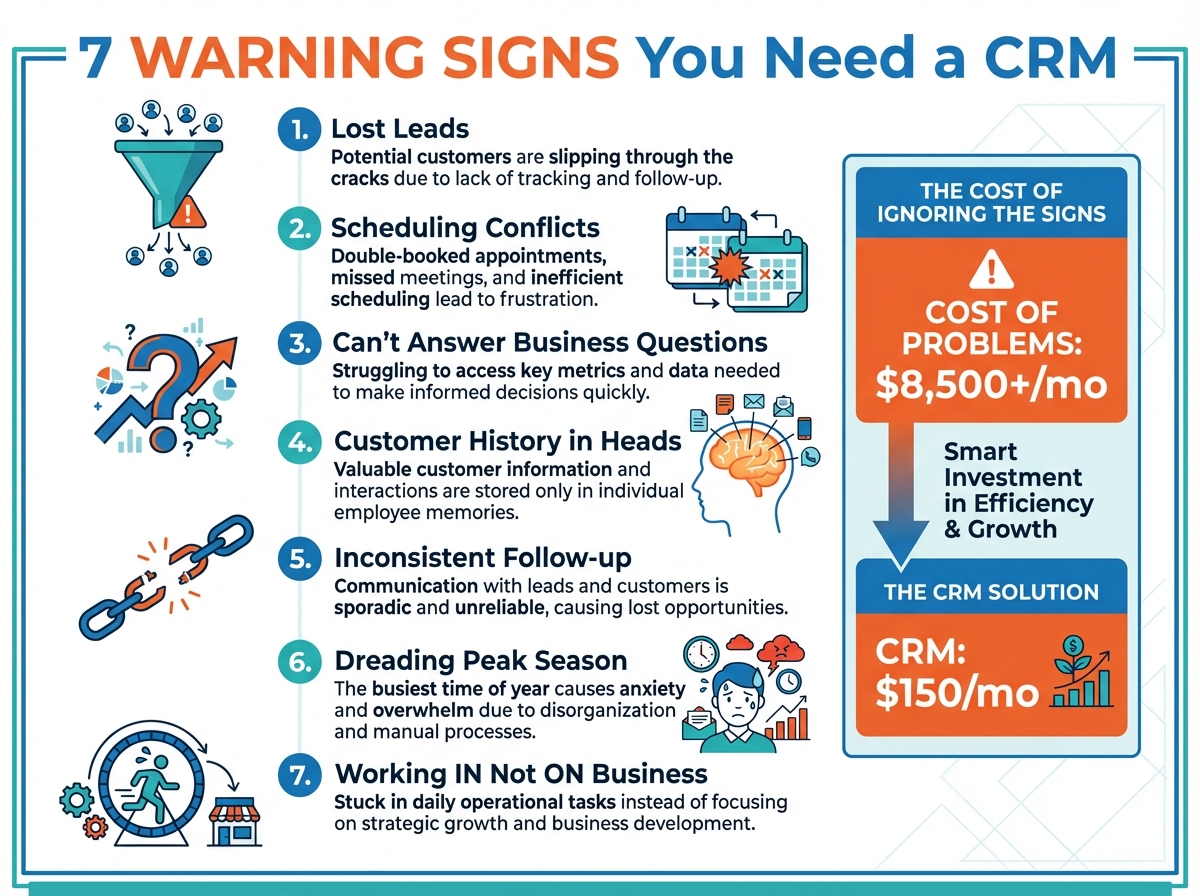
TL;DR: Home service businesses typically outgrow manual systems between 50-200 customers or 3-5 employees. Warning signs include lost leads, scheduling conflicts, missed follow-ups, and inability to track basic metrics. The cost of these problems usually exceeds CRM investment within 60-90 days.
A home service CRM isn't just for big companies. It's for any business where the cost of disorganization exceeds the cost of the software. Here are the seven signs you've reached that point.
Sign 1: You're Losing Leads You Know About
The most expensive leak: leads that came in but never got followed up.
Warning symptoms:
- Finding old lead sheets you forgot about
- Customers mentioning "I called last month but never heard back"
- Sticky notes falling behind desks
- Voicemails discovered days later
- Team members assuming "someone else" followed up
The math:
| Lost Leads/Month | Close Rate | Avg. Job Value | Monthly Loss |
|---|---|---|---|
| 5 | 25% | $2,500 | $3,125 |
| 10 | 25% | $2,500 | $6,250 |
| 20 | 25% | $2,500 | $12,500 |
If you're losing even 5 leads per month to poor tracking, you're likely losing more than a year of CRM costs every month.
What CRM solves:
- Every lead enters one system immediately
- Automatic notifications when leads arrive
- Task reminders for follow-up
- Nothing "falls behind the desk"
- Clear ownership and accountability
Sign 2: Scheduling Conflicts Are Becoming Common
Double-bookings and missed appointments damage customer trust.
Warning symptoms:
- Same technician scheduled for two jobs
- Customers waiting for someone who went elsewhere
- Team members asking "who's supposed to be where?"
- Last-minute scrambling to cover appointments
- Whiteboard erasures making schedule illegible
The hidden costs:
| Scheduling Problem | Direct Cost | Indirect Cost |
|---|---|---|
| Double-booking | Angry customer, wasted trip | Reviews, reputation |
| Wrong address | Wasted travel time | Late for next customer |
| Missed appointment | Service recovery effort | Lost customer lifetime value |
| Last-minute scramble | Overtime, inefficiency | Team stress and turnover |
What CRM solves:
- One calendar showing all technicians
- Conflict warnings before booking
- Customer notifications with correct details
- Real-time schedule visibility for office and field
- Historical record of who went where
Sign 3: You Can't Answer Basic Business Questions
When someone asks "how's business?", you can't give a real answer.
Questions you should be able to answer:
- How many leads came in last month?
- What's your close rate?
- Which marketing channel works best?
- What's your average job value?
- How long does it take to respond to leads?
- Which technician generates the most revenue?
If you're guessing:
You're making business decisions on gut feeling instead of data. That might work for a while, but it eventually leads to:
- Wasting money on marketing that doesn't convert
- Underpricing or overpricing services
- Missing opportunities for improvement
- Unable to prove value to potential buyers or lenders
What CRM solves:
- Automatic tracking of leads, jobs, and revenue
- Source attribution for marketing ROI
- Team performance visibility
- Real-time dashboards
- Answers in seconds, not hours of spreadsheet work
Sign 4: Customer History Lives in People's Heads
When team members leave, customer knowledge leaves with them.
Warning symptoms:
- Technicians asking office "have we been here before?"
- Customers frustrated at repeating their history
- No record of past problems, solutions, or preferences
- Different team members giving different information
- Relying on one person's memory for customer details
The business risk:
| Scenario | Impact |
|---|---|
| Key employee leaves | Customer relationships disrupted |
| Customer calls with follow-up | Nobody knows what happened last time |
| Recurring problem | Same diagnosis repeated instead of escalating |
| Cross-sell opportunity | Missed because history unknown |
What CRM solves:
- Complete customer record accessible to everyone
- Notes from every interaction preserved
- Equipment details, service history, photos stored
- Property information attached to address
- Knowledge survives staff changes
Sign 5: Follow-Up Is Inconsistent or Nonexistent
Estimates go out but nothing happens next.
Warning symptoms:
- "I'll follow up tomorrow" never happens
- Old estimates discovered in email
- Customers asking "did you forget about me?"
- No systematic approach to pending quotes
- Following up on leads based on whoever remembers
The follow-up gap:
Most home service businesses have massive follow-up gaps:
- 80% of sales require 5+ follow-ups
- Average contractor follows up 1-2 times
- 44% of salespeople give up after one follow-up
- 80% of deals are lost to poor follow-up, not competition
What CRM solves:
- Automatic follow-up reminders
- Visibility into pending estimates
- Email/text automation for touchpoints
- Task management with due dates
- Reporting on follow-up compliance
Sign 6: You Dread Peak Season
Busy periods overwhelm your current systems.
Warning symptoms:
- Phones ringing while you're still helping someone
- Leads piling up faster than you can handle
- Scheduling becomes total chaos
- Quality drops as volume increases
- Team burns out during busy months
The peak season problem:
| Challenge | Manual System | CRM System |
|---|---|---|
| High call volume | Leads lost, callers wait | Capture, queue, track |
| Scheduling demand | Double-bookings, conflicts | Real-time availability |
| Follow-up backlog | Estimates forgotten | Automated sequences |
| Team coordination | Confusion, miscommunication | Single source of truth |
What CRM solves:
- Scalable lead capture
- Calendar prevents overbooking
- Automated follow-up handles volume
- Clear assignment and ownership
- Same process works at any volume
Sign 7: You're Working IN the Business, Not ON It
You can't step back because the system falls apart without you.
Warning symptoms:
- You're the only one who knows where everything is
- Taking a day off creates chaos
- Team asks you questions all day instead of working
- No time for strategic planning
- Business can't grow because you're the bottleneck
The owner trap:
| Task | You Doing It | System Doing It |
|---|---|---|
| Where's the customer file? | You answer | CRM search |
| Who's on this job? | You check | CRM shows |
| What's the status of the estimate? | You remember | CRM displays |
| Did anyone follow up? | You ask around | CRM reports |
What CRM solves:
- Self-service answers for team
- Processes documented in workflows
- Less dependence on any one person
- Owner freed for growth work
- Business runs when you're not there
The True Cost of "Not Having a CRM"
People focus on CRM cost. They should focus on current problem cost.
Monthly cost of common problems:
| Problem | Conservative Monthly Cost |
|---|---|
| Lost leads (5/month) | $3,000+ |
| Scheduling conflicts (2/month) | $500+ |
| Missed follow-ups (10/month) | $2,500+ |
| Inefficient operations (10 hrs/month) | $500+ |
| Customer churn (1 customer/month) | $2,000+ |
| Total estimated monthly cost | $8,500+ |
CRM cost:
| Company Size | Typical Monthly CRM Cost |
|---|---|
| 1-3 users | $50-150/month |
| 4-10 users | $150-400/month |
| 11-20 users | $400-800/month |
The problems cost 10-50x more than the solution.
When to Make the Move
The right time depends on your specific situation.
Too Early for CRM:
- Fewer than 20 customers
- Only one person involved
- Very simple scheduling
- Revenue under $100K annually
- Spreadsheet works fine (honestly)
Right Time for CRM:
- 50-200 customers and growing
- 3+ team members involved
- Multiple daily schedule entries
- Leads coming from various sources
- Problems from list above appearing
Waited Too Long for CRM:
- Regular customer complaints about organization
- Employees frustrated by chaos
- Owner working 60+ hours due to inefficiency
- Lost deals exceeding thousands monthly
- Data scattered beyond recovery
The best time: When you notice two or more signs from the list above. Don't wait until all seven apply.
Starting Small with CRM
You don't need every feature on day one.
Phase 1: Lead and Customer Tracking (Week 1-2)
- Enter all current leads
- Import customer database
- Train on basic search and entry
- Establish "everything goes in CRM" rule
Phase 2: Scheduling Integration (Week 2-4)
- Move calendar to CRM
- Train dispatchers on booking
- Enable customer notifications
- Retire whiteboard/spreadsheet
Phase 3: Follow-Up Automation (Month 2)
- Set up estimate follow-up reminders
- Create email templates
- Enable automated touchpoints
- Track response and outcomes
Phase 4: Reporting and Optimization (Month 2-3)
- Build key dashboards
- Review source tracking
- Analyze conversion rates
- Start optimizing based on data
Choosing the Right CRM for Home Services
Not every CRM suits contractors.
Requirements for Home Service CRM:
| Feature | Why It Matters |
|---|---|
| Service address tracking | Different from billing address |
| Job scheduling | Visual dispatch calendar |
| Mobile app | Field team needs access |
| Customer communication | Text and email from system |
| Equipment/property tracking | Remember what's at each location |
| QuickBooks integration | Sync financial data |
Red Flags in CRM Selection:
- Designed for retail or general sales
- No mobile app or poor mobile experience
- Complicated setup requiring IT help
- No scheduling features built in
- Expensive add-ons for basic features
Compare options specifically designed for home services—or at minimum, CRMs with contractor-specific features and templates.
Frequently Asked Questions
How long does CRM implementation take?
Basic setup takes 1-2 weeks for small teams. Full adoption with all features typically takes 60-90 days. The key is starting simple (contacts and calendar) then adding complexity. Don't try to implement everything at once.
What if my team resists using new software?
Resistance usually comes from fear of change or unclear benefit. Address both: show how CRM helps them (faster answers, less confusion) and make it required for job completion. Start with enthusiastic adopters, prove value, then expand. Tie it to compensation if needed.
Can I import my existing customer data?
Yes. Most CRMs accept CSV imports from spreadsheets. Plan for data cleanup during migration—inconsistent formats, duplicates, and incomplete records are common. It's a one-time effort that pays dividends.
Stop Losing Money to Disorganization
Every sign on this list represents money walking out your door. Lost leads, scheduling chaos, missed follow-ups, and operational inefficiency cost far more than any CRM subscription.
Key takeaways:
- 2+ warning signs = time to consider CRM
- Lost lead cost alone often exceeds annual CRM cost monthly
- Start simple and expand features over time
- Choose software designed for home services
- Implementation takes weeks, not months
The contractors who thrive aren't always the most skilled—they're the most organized. Organization at scale requires systems.
If you recognized your business in these signs, the question isn't whether to get a CRM. It's how much longer you can afford to wait.
Ready to stop losing leads and opportunities? Start your free trial with TruLine and see how organization transforms your business.