Your technician finishes a repair call. The customer asks about a maintenance agreement. Your tech fumbles with paper forms, can't remember the pricing, and says "I'll have the office call you."
The office never calls. The customer never signs up. You just lost $1,200 in recurring revenue because your technician didn't have the right tools in their hands.
Field technicians are your front line for sales. But without mobile access to customer history, pricing, and sales tools, they're fighting with one hand tied behind their back.
TL;DR: Mobile CRM for field technicians increases average ticket by 15-25% and maintenance agreement attachment rates by 40-60%. Essential features include offline access, customer history, pricing/quoting, and easy data entry. Implementation success requires involving technicians in selection, keeping the interface simple, and providing adequate training. The best mobile CRM reduces admin time while increasing sales opportunities at every service call.
The right mobile CRM turns every technician into a sales representative—without making them feel like salespeople.
Why Mobile CRM Matters for Field Teams
Field technicians have fundamentally different needs than office staff.
The Field Technician Reality
What technicians face daily:
| Challenge | Without Mobile CRM | With Mobile CRM |
|---|---|---|
| Customer history | "Let me call the office" | Instant access |
| Equipment details | Guessing or re-diagnosing | Full service history |
| Pricing quotes | Paper price book, math | Instant calculations |
| Paperwork | Handwritten, lost, illegible | Digital, synced, searchable |
| Follow-up tasks | Forgotten or delayed | Automatic creation |
The Business Impact
Mobile CRM drives measurable results:
| Metric | Without | With | Improvement |
|---|---|---|---|
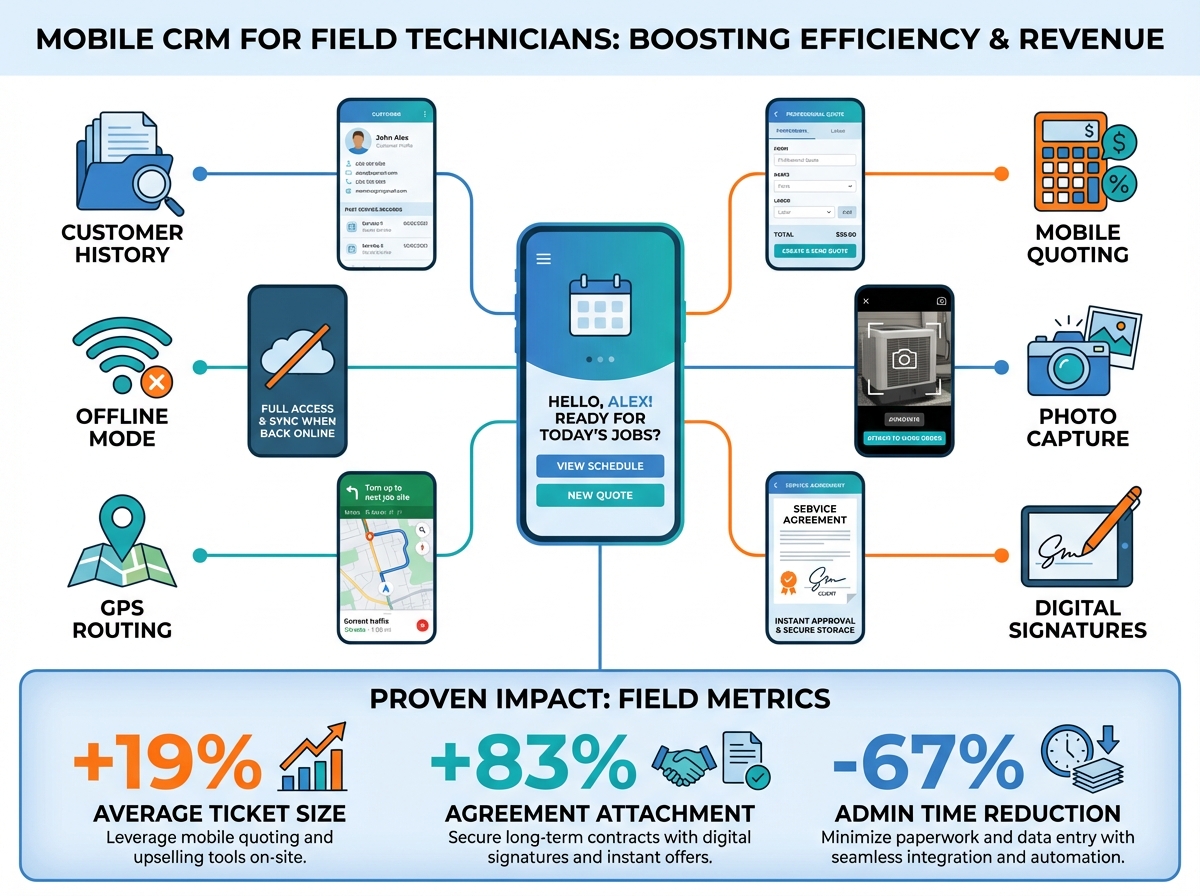
| Average ticket | $285 | $340 | +19% |
| Agreement attachment | 12% | 22% | +83% |
| Quote accuracy | 78% | 98% | +26% |
| Admin time/call | 15 min | 5 min | -67% |
| Same-day follow-up | 34% | 89% | +162% |
Annual revenue impact for 10-tech company:
- Additional ticket revenue: $165,000/year
- Additional agreements: $48,000/year recurring
- Time savings: 2,000+ hours/year
Essential Mobile CRM Features
Not all CRM mobile apps are created equal. Here's what matters for field technicians.
Customer History Access
What technicians need to see:
| Information | Why It Matters |
|---|---|
| Previous services | Understand equipment history |
| Past quotes (accepted/declined) | Know what's been discussed |
| Equipment details | Age, model, warranty status |
| Notes from previous techs | Continuity of service |
| Communication history | Know what office has discussed |
| Payment history | Identify VIP vs. problem customers |
Access requirements:
- Load in under 3 seconds
- Available offline (syncs when connected)
- Searchable by address, name, or phone
- Clear, scannable layout
Mobile Quoting & Pricing
Real-time quoting capabilities:
| Feature | Benefit |
|---|---|
| Good-better-best options | Present three choices easily |
| Dynamic pricing | Adjust for complexity, materials |
| Financing integration | Show monthly payment options |
| Digital signature capture | Close on the spot |
| Instant email delivery | Customer gets quote immediately |
What good mobile quoting looks like:
- Tech selects service/equipment
- System calculates pricing
- Three options displayed
- Customer signs on screen
- Confirmation sent automatically
Offline Functionality
Critical for field work:
| Scenario | Without Offline | With Offline |
|---|---|---|
| Basement service call | No data access | Full functionality |
| Rural area | Can't load customer | Works normally |
| Weak cell signal | Constant loading errors | Syncs when available |
What should work offline:
- Customer lookup
- Quote creation
- Form completion
- Photo capture
- Notes and updates
- Schedule viewing
Sync behavior:
- Automatic when connection restores
- Conflict resolution for simultaneous edits
- Clear indicators of sync status
Photo and Documentation
Visual documentation needs:
| Use Case | Feature Required |
|---|---|
| Before/after photos | Easy capture, auto-attach to job |
| Equipment photos | Model/serial capture, OCR |
| Problem documentation | Annotate photos with notes |
| Safety concerns | Flag and document issues |
| Warranty verification | Photo proof of install date |
Photo workflow:
- Open camera from job screen
- Capture photo
- Add quick note (optional)
- Auto-attached to job record
- Synced to office view
Schedule and Route Management
Technician schedule features:
| Feature | Purpose |
|---|---|
| Daily schedule view | See all appointments |
| Turn-by-turn navigation | One-tap directions |
| Schedule changes | Real-time updates from dispatch |
| Time tracking | Automatic arrival/departure |
| Job duration estimates | Plan the day effectively |
Communication Tools
Field-to-office communication:
| Tool | Use Case |
|---|---|
| In-app messaging | Quick questions to dispatch |
| Customer texting | "On my way" notifications |
| Photo sharing | Show office what you're seeing |
| Voice notes | Faster than typing |
| Call logging | Automatic record of customer calls |
User Interface Principles
Mobile CRM succeeds or fails based on interface design.
Design for Gloved Hands
Field work realities:
| Challenge | Design Solution |
|---|---|
| Dirty/gloved hands | Large touch targets (44px+) |
| Bright sunlight | High contrast, adjustable brightness |
| Quick glances | Essential info visible first |
| Interruptions | Save state automatically |
| One-handed use | Key actions reachable with thumb |
Minimize Typing
Data entry solutions:
| Instead of Typing | Use |
|---|---|
| Long descriptions | Dropdown selections |
| Equipment models | Barcode/QR scanning |
| Customer signatures | Touch signature capture |
| Notes | Voice-to-text |
| Addresses | GPS auto-fill |
Progressive Disclosure
Information hierarchy:
| Level | What Shows | When |
|---|---|---|
| 1 | Essential job info | Always visible |
| 2 | Customer history | One tap away |
| 3 | Detailed records | When needed |
| 4 | Admin functions | In settings menu |
Example: Job screen hierarchy
- Level 1: Customer name, address, job type, time
- Level 2: Equipment details, previous services
- Level 3: Full service history, all notes
- Level 4: Account settings, payment details
Implementation Best Practices
Rolling out mobile CRM requires more than just downloading an app.
Involve Technicians Early
Technician input matters for:
| Decision | Why Tech Input Helps |
|---|---|
| Feature selection | Know what they actually need |
| Interface design | Identify usability issues |
| Workflow design | Match how they actually work |
| Training approach | Learn their learning styles |
| Rollout timing | Avoid busiest periods |
How to involve technicians:
- Survey current pain points
- Demo 2-3 options, gather feedback
- Pilot with 2-3 tech "champions"
- Iterate based on real-world use
- Champions help train others
Training Approaches
Effective mobile CRM training:
| Method | Best For |
|---|---|
| Hands-on workshop | Initial feature introduction |
| Ride-along coaching | Real-world application |
| Video tutorials | Refresher and reference |
| Quick reference cards | Field troubleshooting |
| Peer mentoring | Ongoing support |
Training schedule:
| Phase | Duration | Focus |
|---|---|---|
| Initial training | 4 hours | Core features, basic workflow |
| Supervised use | 1 week | Support during real calls |
| Advanced training | 2 hours | Quoting, sales features |
| Ongoing support | Continuous | Questions, new features |
Device Selection
Mobile device considerations:
| Factor | Recommendation |
|---|---|
| Operating system | iOS or Android (match your CRM) |
| Screen size | 5.5"+ for readability |
| Durability | Rugged case required |
| Battery life | Full day minimum |
| Storage | 64GB+ for offline data |
| Company vs. BYOD | Company-owned preferred |
Company device advantages:
- Consistent experience across team
- IT can manage and secure
- No personal data concerns
- Easier support and replacement
Rollout Strategy
Phased implementation:
| Phase | Timeline | Activities |
|---|---|---|
| 1. Pilot | Weeks 1-2 | 2-3 tech champions use daily |
| 2. Feedback | Week 3 | Gather input, make adjustments |
| 3. Wave 1 | Weeks 4-5 | Half of team onboarded |
| 4. Wave 2 | Weeks 6-7 | Remaining team onboarded |
| 5. Optimization | Week 8+ | Refine workflows, advanced training |
Common Challenges and Solutions
Anticipate these issues during implementation.
Challenge 1: Technician Resistance
Why techs resist:
- "This is more work"
- "The old way was fine"
- "I'm not good with technology"
- "This is just tracking me"
Solutions:
| Concern | Response |
|---|---|
| More work | Show time savings after learning curve |
| Old way worked | Demonstrate capability gaps |
| Technology fears | Extra training, patient support |
| Surveillance worry | Emphasize tools, not tracking |
Key message: "This makes your job easier and helps you earn more."
Challenge 2: Connectivity Issues
When internet is unreliable:
| Strategy | Implementation |
|---|---|
| Robust offline mode | Ensure CRM works without connection |
| Sync indicators | Clear status of data freshness |
| Conflict handling | Automatic resolution of edit conflicts |
| Data compression | Minimize bandwidth requirements |
Challenge 3: Battery Drain
Preserving battery life:
| Tactic | Impact |
|---|---|
| Reduce sync frequency | Major battery savings |
| Lower screen brightness | Moderate savings |
| Disable unused features | Minor savings |
| Carry backup charger | Always have power |
Challenge 4: Data Entry Compliance
Getting techs to enter data:
| Strategy | How It Works |
|---|---|
| Require for job completion | Can't close job without fields |
| Show immediate benefit | "This helps your commission" |
| Make it easy | Dropdowns, defaults, voice |
| Gamify compliance | Leaderboard for data quality |
| Audit and coach | Review and provide feedback |
Measuring Mobile CRM Success
Track these metrics to ensure adoption and ROI.
Adoption Metrics
| Metric | Target | Measurement |
|---|---|---|
| Daily active users | 100% of techs | Login tracking |
| Features used | Core features daily | Feature analytics |
| Data entry completeness | 95%+ | Required field audits |
| Offline usage | Works when needed | Offline session logs |
Productivity Metrics
| Metric | Baseline | Target | Tracking |
|---|---|---|---|
| Time per job (admin) | 15 min | 5 min | Time stamps |
| Quote generation time | 10 min | 2 min | Quote timestamps |
| Same-day follow-up | 34% | 90%+ | Task completion |
| Data errors | 12% | <2% | Error audits |
Sales Metrics
| Metric | Baseline | Target | Impact |
|---|---|---|---|
| Average ticket | $285 | $340+ | Revenue increase |
| Agreement attachment | 12% | 20%+ | Recurring revenue |
| Quote acceptance | 45% | 55%+ | Close rate improvement |
| Upsell rate | 18% | 28%+ | Ticket growth |
ROI Calculation
Mobile CRM ROI formula:
ROI = (Revenue Increase + Cost Savings - Investment) / Investment × 100
Example for 10-technician company:
| Factor | Amount |
|---|---|
| Additional revenue | $213,000/year |
| Time savings value | $48,000/year |
| Total benefit | $261,000/year |
| CRM investment | $24,000/year |
| ROI | 988% |
Integration with Office Systems
Mobile CRM works best when connected to office operations.
Essential Integrations
| System | Integration Benefit |
|---|---|
| Dispatching | Real-time schedule updates |
| Accounting | Invoice sync, payment status |
| Inventory | Parts availability, ordering |
| Marketing | Lead source visibility |
| Phone system | Call logging, recording access |
Data Flow Best Practices
Field to office:
- Job completion → automatic invoice creation
- Customer notes → visible to CSRs immediately
- Photos → attached to customer record
- Follow-up tasks → assigned to appropriate person
Office to field:
- Schedule changes → instant notification
- Customer updates → visible on next job
- Pricing changes → reflected in quotes
- New leads → routed to available techs
Selecting the Right Mobile CRM
Evaluate options against field-specific requirements.
Evaluation Checklist
| Requirement | Weight | Questions to Ask |
|---|---|---|
| Offline functionality | High | What works without internet? |
| Interface simplicity | High | Can a non-tech person use it easily? |
| Integration depth | High | How does it connect to our systems? |
| Quoting capability | High | Can we build good-better-best easily? |
| Photo handling | Medium | How easy is photo capture/annotation? |
| Customization | Medium | Can we add our fields and workflows? |
| Support quality | Medium | What's the response time? |
| Mobile-first design | High | Was it built for mobile or adapted? |
Red Flags to Avoid
| Red Flag | Why It's a Problem |
|---|---|
| Desktop-first design | Poor mobile experience |
| No offline mode | Useless in many field situations |
| Complex navigation | Slows down technicians |
| Slow loading | Frustration, abandonment |
| Poor photo handling | Critical documentation gaps |
| No voice input | Excessive typing required |
Frequently Asked Questions
Should technicians use personal phones or company devices?
Company-owned devices are preferred for several reasons: consistent experience, easier IT management, no mixing of personal and work data, and simpler support. If budget requires BYOD, use mobile device management (MDM) software to separate and secure company data, and provide a stipend for business use.
How do we get resistant technicians to adopt mobile CRM?
Start with tech "champions" who are more technology-friendly. Let them demonstrate success to peers. Focus messaging on how the CRM helps technicians earn more (better quotes, more agreements) rather than on company benefits. Provide generous training and patient support for those less comfortable with technology.
What's the minimum viable mobile CRM functionality?
At minimum, technicians need: customer history access, basic quoting capability, job completion workflow, and photo capture. These four functions cover the essential field needs. Additional features like advanced analytics, inventory, and financing integration are valuable but secondary to these core capabilities.
Equip Your Field Team for Success
Mobile CRM transforms technicians from service providers into sales partners. When they have customer history, pricing tools, and easy workflows in their hands, they can identify opportunities and close deals that would otherwise be lost.
Key takeaways:
- Mobile CRM increases average ticket 15-25% and agreement rates 40-60%
- Essential features: offline access, customer history, mobile quoting, photo capture
- Design for field realities: gloved hands, bright sun, quick interactions
- Involve technicians in selection and implementation
- Measure adoption, productivity, and sales metrics to ensure ROI
The best technicians want to help customers and earn more. Give them the tools to do both, and everyone wins—customers, technicians, and your business.
Ready to equip your field team with mobile CRM? Start your free trial with TruLine and see the difference mobile-first design makes for technician productivity.