You've narrowed your field service software search to two finalists: Jobber and Housecall Pro. Both promise to streamline scheduling, invoicing, and customer communication. Both have thousands of positive reviews. Both could probably work for your business.
But one will fit better than the other—and choosing wrong means painful migration later when you outgrow the platform or hit a critical missing feature.
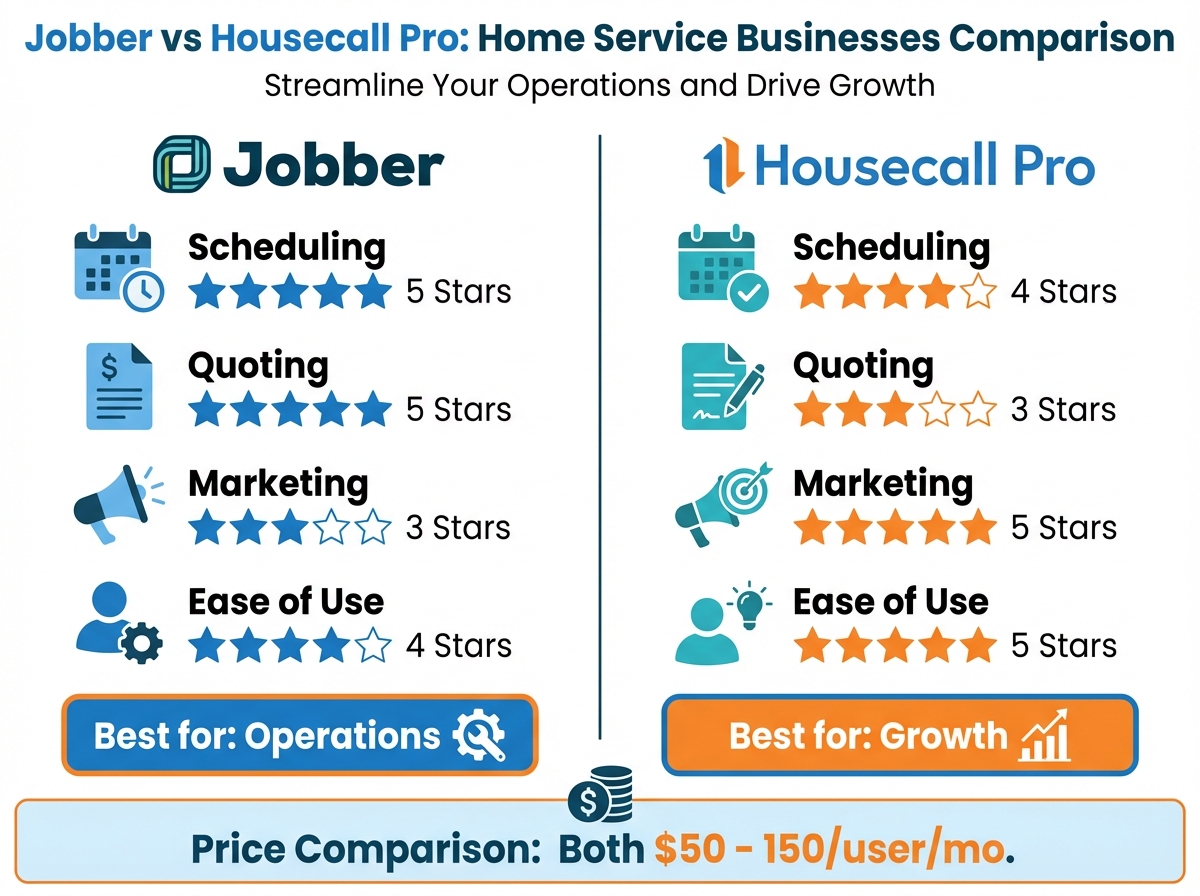
TL;DR: Jobber excels at scheduling, quoting, and job management with a cleaner interface, making it ideal for businesses prioritizing operational efficiency. Housecall Pro offers stronger marketing features, online booking, and a flatter learning curve, making it better for customer-acquisition-focused businesses. Pricing is similar ($50-150/user/month), but value depends on which features matter most for your workflow.
Both platforms serve home service businesses well. The right choice depends on your priorities: operational control (Jobber) versus growth and marketing (Housecall Pro). Here's the detailed breakdown.
Quick Comparison Overview
At a glance:
| Factor | Jobber | Housecall Pro |
|---|---|---|
| Best for | Operations-focused businesses | Growth-focused businesses |
| Scheduling | ⭐⭐⭐⭐⭐ Excellent | ⭐⭐⭐⭐ Good |
| Quoting | ⭐⭐⭐⭐⭐ Excellent | ⭐⭐⭐ Basic |
| Marketing tools | ⭐⭐⭐ Basic | ⭐⭐⭐⭐⭐ Strong |
| Online booking | ⭐⭐⭐⭐ Good | ⭐⭐⭐⭐⭐ Excellent |
| Ease of use | ⭐⭐⭐⭐ Good | ⭐⭐⭐⭐⭐ Very easy |
| Mobile app | ⭐⭐⭐⭐⭐ Excellent | ⭐⭐⭐⭐ Good |
| Reporting | ⭐⭐⭐⭐⭐ Comprehensive | ⭐⭐⭐⭐ Good |
| Pricing | $$ | $$ |
Pricing Comparison
Both platforms use tiered pricing. Costs scale with users and features.
Jobber Pricing (2026)
| Plan | Monthly Cost | Users | Key Features |
|---|---|---|---|
| Core | $49/mo | 1 | Basic scheduling, invoicing, CRM |
| Connect | $129/mo | Up to 5 | Quoting, automated reminders, online booking |
| Grow | $249/mo | Up to 15 | Reporting, job forms, two-way texting |
Additional costs:
- Additional users: ~$29/user/month beyond plan limits
- Payment processing: 2.9% + $0.30 per transaction
- QuickBooks integration: Included
- Add-ons available for some features
Housecall Pro Pricing (2026)
| Plan | Monthly Cost | Users | Key Features |
|---|---|---|---|
| Basic | $65/mo | 1 | Scheduling, invoicing, estimates |
| Essentials | $169/mo | Up to 5 | Online booking, review management, reporting |
| Max | $299/mo | Unlimited | Recurring billing, advanced analytics, API |
Additional costs:
- Additional users: ~$35/user/month on lower tiers
- Payment processing: 2.59% + $0.00 per transaction (better rate)
- Instapay (same-day deposits): Additional fee
- Marketing features may require higher tier
True Cost Comparison
For a 5-person team:
| Cost Factor | Jobber (Connect) | Housecall Pro (Essentials) |
|---|---|---|
| Monthly subscription | $129 | $169 |
| Annual cost | $1,548 | $2,028 |
| Payment processing (on $50K) | $1,600 | $1,295 |
| Total annual cost | $3,148 | $3,323 |
Costs are similar, with Jobber slightly cheaper on subscription and Housecall Pro slightly cheaper on payment processing.
Scheduling and Dispatch
The core function—how well each platform handles getting the right person to the right job.
Jobber Scheduling
Strengths:
- Drag-and-drop calendar with multiple views
- Route optimization built in
- Team scheduling with availability tracking
- Recurring job automation
- Job duration tracking for better estimates
- Color-coded by job type, status, or team
Scheduling workflow:
- Create job from CRM or new request
- System suggests optimal time based on location and team availability
- Assign team members with one click
- Automatic customer notification
- Team sees assignment in mobile app
- Real-time updates as status changes
Limitations:
- Route optimization requires higher tier
- Complexity can slow down new users
Housecall Pro Scheduling
Strengths:
- Simple, intuitive interface
- GPS tracking of technicians
- Customer self-scheduling integration
- Dispatch board for quick assignment
- Automatic arrival notifications to customers
- Easy drag-and-drop
Scheduling workflow:
- Job enters system (manual or online booking)
- Dispatch board shows team availability
- Drag job to technician's schedule
- Customer receives confirmation
- "On my way" text sent automatically
- Status updates visible to office
Limitations:
- Less sophisticated route optimization
- Fewer calendar view options
- Limited recurring scheduling on lower tiers
Verdict: Scheduling
Jobber wins for complex scheduling needs—multiple crews, route optimization, detailed job tracking.
Housecall Pro wins for simplicity—easy dispatch, customer self-booking, quick team adoption.
Quoting and Estimates
How each platform handles creating and sending quotes.
Jobber Quoting
Strengths:
- Professional, customizable templates
- Line-item detail with labor and materials
- Optional and required items
- Package options (good-better-best)
- Quote-to-job conversion with one click
- Customer e-signature
- Automated follow-up on pending quotes
Quote features:
- Add photos and attachments
- Include terms and conditions
- Deposit collection with quote acceptance
- Track quote view and open rates
- Bulk quote reminders
Housecall Pro Estimating
Strengths:
- Quick estimate creation
- Send via text or email
- Basic customization
- E-signature
- Convert to job easily
Limitations:
- Less detailed line items
- Fewer customization options
- No built-in good-better-best packages
- Limited quote tracking
Verdict: Quoting
Jobber wins clearly for quoting. If your business relies on professional estimates with options, Jobber's quote builder is significantly more capable. Housecall Pro's estimating is functional but basic.
Invoicing and Payments
Getting paid—the ultimate goal.
Jobber Invoicing
Strengths:
- Generate from completed jobs automatically
- Customizable invoice templates
- Accept cards, ACH, checks
- Recurring invoicing for maintenance
- Batch invoicing
- Integrate with QuickBooks
- Payment reminders and collections
Payment processing:
- 2.9% + $0.30 per transaction
- ACH payments available
- Tips enabled
- Deposit processing
Housecall Pro Invoicing
Strengths:
- One-click invoice from completed job
- Accept cards on-site
- Instapay for same-day deposits
- Consumer financing (buy-now-pay-later)
- Simple payment link sharing
- QuickBooks integration
Payment processing:
- 2.59% per transaction (no per-transaction fee)
- Instapay for same-day at additional cost
- Financing options through partners
Verdict: Invoicing
Tie with different advantages. Jobber offers more invoice customization and recurring billing strength. Housecall Pro offers better payment processing rates and consumer financing integration. Choose based on your priority.
Marketing and Customer Communication
How each platform helps you grow.
Jobber Marketing
Strengths:
- Automated review requests after jobs
- Basic email campaigns
- Referral tracking
- Customer follow-up automation
- Two-way text messaging (higher tier)
Limitations:
- Marketing features are add-on focused
- Less robust than dedicated marketing tools
- Email marketing is basic
Housecall Pro Marketing
Strengths:
- Built-in review management with direct Google integration
- Email marketing campaigns
- Postcard/direct mail integration
- Customer reactivation campaigns
- "On my way" texts create engagement
- Review response tools
- Marketing automation workflows
Marketing automation includes:
- Review request sequences
- Rebooking reminders
- Seasonal campaign templates
- Customer win-back series
Verdict: Marketing
Housecall Pro wins for marketing capabilities. If customer acquisition and reviews are priorities, Housecall Pro offers significantly more built-in tools. Jobber treats marketing as secondary to operations.
Mobile App Experience
Field teams live in the mobile app. Quality matters.
Jobber Mobile App
Strengths:
- Full functionality on mobile
- Offline mode for jobs
- GPS clock-in/clock-out
- Photo capture and attachment
- Customer signature collection
- Job timers
- Clean interface
App store ratings: 4.7/5 (iOS), 4.5/5 (Android)
User feedback: Praised for completeness and reliability. Some notes about occasional sync delays.
Housecall Pro Mobile App
Strengths:
- Very intuitive interface
- Quick job completion workflow
- Payment collection on-site
- Photo capture
- Customer communication
- GPS tracking
App store ratings: 4.8/5 (iOS), 4.6/5 (Android)
User feedback: Praised for simplicity and speed. Some notes about limited offline functionality.
Verdict: Mobile App
Slight edge to Housecall Pro for ease of use. Jobber wins for offline functionality and completeness. Both are solid—field teams should test during trial.
Reporting and Analytics
Understanding your business performance.
Jobber Reporting
Strengths:
- Comprehensive report library
- Customizable dashboards
- Job profitability tracking
- Team performance metrics
- Revenue by service type
- Quote conversion tracking
- Client value analysis
- Scheduling efficiency reports
Report categories:
- Financial (revenue, expenses, profitability)
- Operational (jobs, scheduling, time tracking)
- Sales (quotes, win rates, lead sources)
- Customer (retention, lifetime value)
Housecall Pro Reporting
Strengths:
- Clear, visual dashboards
- Revenue tracking
- Team performance
- Call tracking analytics
- Review and rating trends
- Marketing ROI tracking
Limitations:
- Less customization
- Fewer report types
- Limited drill-down capability
Verdict: Reporting
Jobber wins for reporting depth and customization. If data-driven decisions matter, Jobber offers more analytical power. Housecall Pro provides good basics but less depth.
Integrations
Connecting with other tools in your stack.
Jobber Integrations
Key integrations:
- QuickBooks Online and Desktop
- Stripe (payments)
- Mailchimp (email marketing)
- Zapier (connects 3,000+ apps)
- Google Calendar
- FleetSharp (GPS)
- Broadly (reviews)
API: Available on higher tiers for custom integrations.
Housecall Pro Integrations
Key integrations:
- QuickBooks Online
- Google Local Services Ads
- Home Depot Pro Xtra
- Mailchimp
- Zapier
- Various financing partners
- Google Calendar
API: Available for custom integrations.
Verdict: Integrations
Tie. Both integrate with essential tools (QuickBooks, Zapier, calendar apps). Housecall Pro has unique partnerships (Google Local Services, Home Depot). Jobber has broader Zapier support. Check specific integrations you need.
Industry Fit
Which trades does each platform serve best?
Best Fit for Jobber
- Landscaping and lawn care - Strong recurring job support
- Cleaning services - Team scheduling and route optimization
- Plumbing - Detailed quoting and job tracking
- Pool service - Route optimization and recurring visits
- Painting - Quote building with materials
Why: Jobber's operational depth suits businesses with complex scheduling, recurring services, and detailed quoting needs.
Best Fit for Housecall Pro
- HVAC - Consumer financing integration
- Electrical - Quick estimates, strong mobile
- Appliance repair - Simple scheduling, fast invoicing
- Handyman services - Easy to learn, flexible
- Pest control - Marketing and reactivation tools
Why: Housecall Pro's ease of use and marketing tools suit businesses focused on customer acquisition and quick transactions.
Customer Support Comparison
When you need help.
Jobber Support
Available:
- Phone support (business hours, North America)
- Email support
- Chat support
- Extensive help center
- Video tutorials
- Community forum
User feedback: Generally positive reviews for responsive support. Some notes about wait times during peak periods.
Housecall Pro Support
Available:
- Phone support (extended hours)
- In-app chat
- Email support
- Help center
- Dedicated onboarding assistance
- Facebook community group
User feedback: Strong reviews for onboarding help. Mixed reviews for ongoing support response times.
Verdict: Support
Tie with different strengths. Jobber has comprehensive self-service resources. Housecall Pro provides stronger initial onboarding. Both have occasional support delays reported.
User Experience and Learning Curve
How quickly can your team get productive?
Jobber Learning Curve
Time to basic proficiency: 2-4 hours Time to full proficiency: 1-2 weeks
Learning path:
- Clean interface, logical organization
- More features = more to learn
- Comprehensive onboarding resources
- May feel complex initially
Best for: Teams willing to invest in learning for long-term capability.
Housecall Pro Learning Curve
Time to basic proficiency: 1-2 hours Time to full proficiency: 3-5 days
Learning path:
- Very intuitive interface
- Fewer features = faster learning
- Good mobile-first design
- Team adoption typically faster
Best for: Teams wanting quick deployment and easy adoption.
Verdict: Learning Curve
Housecall Pro wins for fastest time-to-value. Jobber has more capability but requires more learning investment.
Making Your Decision
Use this framework to choose.
Choose Jobber If:
- Scheduling complexity is high (multiple crews, routes, recurring jobs)
- Professional quoting is critical to your sales process
- You need detailed reporting and analytics
- Your team will invest time in learning the platform
- Operational efficiency is your primary goal
Choose Housecall Pro If:
- Customer acquisition and marketing are priorities
- You want the fastest team adoption
- Consumer financing would help close sales
- Online booking and self-scheduling matter
- Simplicity is more important than feature depth
Decision Scorecard
Rate each factor 1-5 based on importance to your business:
| Factor | Your Weight | Jobber Score | HCP Score |
|---|---|---|---|
| Scheduling power | __ | 5 | 4 |
| Quoting capability | __ | 5 | 3 |
| Marketing tools | __ | 3 | 5 |
| Ease of use | __ | 4 | 5 |
| Reporting depth | __ | 5 | 4 |
| Mobile app | __ | 4 | 5 |
| Price value | __ | 4 | 4 |
| Weighted Total | __ | __ |
Calculate: Weight × Score for each. Highest total wins for your priorities.
Switching Considerations
Already on one platform? Here's what to consider.
If You're on Jobber Considering Housecall Pro:
Good reasons to switch:
- Need stronger marketing tools
- Team struggles with Jobber complexity
- Want consumer financing integration
Reasons to stay:
- Heavy quoting workflow would suffer
- Invested in Jobber's reporting
- Complex scheduling working well
If You're on Housecall Pro Considering Jobber:
Good reasons to switch:
- Outgrowing HCP's quoting capabilities
- Need more reporting depth
- Want route optimization
Reasons to stay:
- Team loves the simplicity
- Marketing features driving growth
- No major operational gaps
Frequently Asked Questions
Can I try both before deciding?
Yes. Both offer free trials—Jobber typically 14 days, Housecall Pro 14 days. Use real scenarios during trials: create actual quotes, schedule real jobs, test mobile with your team. Don't just click around—actually work in the system.
Which has better customer support?
Both have mixed reviews with generally positive sentiment. Housecall Pro excels at onboarding assistance. Jobber has more comprehensive self-service documentation. For ongoing support, experiences vary by issue and timing.
Can I switch after starting with one?
Yes, but there's friction. Customer data exports to CSV. Job history may not transfer cleanly. Team needs retraining. Plan 2-4 weeks for proper migration. Many businesses avoid switching by choosing carefully initially.
Find Your Best Fit
Jobber and Housecall Pro are both excellent platforms—which is why this decision is hard. Neither is universally better; each excels in different areas.
Key takeaways:
- Jobber = Operations powerhouse (scheduling, quoting, reporting)
- Housecall Pro = Growth engine (marketing, ease of use, financing)
- Pricing is similar; value depends on which features you'll use
- Both mobile apps are solid; test with your team
- Try both during free trials with real scenarios
The best choice depends on what your business needs most right now—and where you're headed. Operational complexity favors Jobber. Growth and simplicity favor Housecall Pro.
Want to compare more options? Start your free trial with TruLine and see how a home service CRM purpose-built for sales performance compares to field service platforms.