You gave a $14,000 estimate three weeks ago. The homeowner seemed interested, asked good questions, and said they'd "think about it." You meant to follow up. Then emergency calls came in. Then the weekend. Then you forgot.
Yesterday, you saw their neighbor's house getting a new roof—from your competitor.
That lost deal wasn't lost because of price or quality. It was lost because you didn't follow up. And with 50 estimates out at any given time, manual follow-up is impossible.
TL;DR: Automated follow-up increases estimate close rates by 25-40% by ensuring every lead gets consistent contact. The optimal sequence combines immediate response (within 5 minutes), multi-channel outreach (email, text, phone reminders), and persistence (5-7 touches over 14-21 days). Most contractors follow up 1-2 times; 80% of sales require 5+ touchpoints. Automation closes the gap without adding staff.
The contractors closing the most deals aren't necessarily the best salespeople—they're the most persistent. Automation makes persistence possible.
Why Follow-Up Matters So Much
The statistics on follow-up are striking—and most contractors fall far short.
The Follow-Up Gap
Industry research shows:
| Statistic | Implication |
|---|---|
| 80% of sales require 5+ follow-ups | Persistence wins |
| 44% of salespeople give up after 1 follow-up | Massive opportunity |
| 92% give up after 4 follow-ups | Almost no one reaches 5+ |
| 50% of leads are never followed up at all | Half your marketing is wasted |
What this means for contractors:
- Most of your competitors give up after 1-2 attempts
- Simply following up more puts you ahead
- The business goes to whoever stays top-of-mind
Why Manual Follow-Up Fails
The reality of manual follow-up:
| Challenge | Result |
|---|---|
| Busy days | Follow-up gets postponed |
| No system | Different leads treated differently |
| Forgotten promises | "I'll call tomorrow" never happens |
| Cherry-picking | Easy leads followed, hard ones ignored |
| Fatigue | After 3 attempts, motivation drops |
The math problem:
- 50 open estimates
- 5 follow-ups needed each
- 250 touchpoints required
- Manual: Impossible without dedicated staff
- Automated: Happens automatically
The Anatomy of Effective Follow-Up
Not all follow-up is created equal. Here's what works.
Speed to Lead
First response timing matters enormously:
| Response Time | Contact Rate | Appointment Rate |
|---|---|---|
| Under 5 minutes | 85-95% | 45-55% |
| 5-30 minutes | 65-75% | 30-40% |
| 30-60 minutes | 45-55% | 20-30% |
| 1-24 hours | 25-35% | 10-20% |
| Over 24 hours | Under 20% | Under 10% |
Automation enables instant response:
- Auto-text sent within seconds of lead submission
- Notification to sales team for immediate call
- No leads sitting in inbox overnight
Multi-Channel Approach
Different people prefer different communication:
| Channel | Strengths | Best For |
|---|---|---|
| Phone call | Personal, immediate, dialogue | Initial contact, closing |
| Text message | Quick, high open rate, convenient | Reminders, quick questions |
| Detailed information, documentation | Quotes, follow-up content | |
| Voicemail | Personal touch when not reached | Relationship building |
Effective sequences use all channels:
- Text for immediate acknowledgment
- Call for conversation
- Email for information
- Text reminders for urgency
Persistence Without Annoyance
The fine line:
- Too little: Lead forgets you exist
- Too much: Lead gets annoyed, blocks you
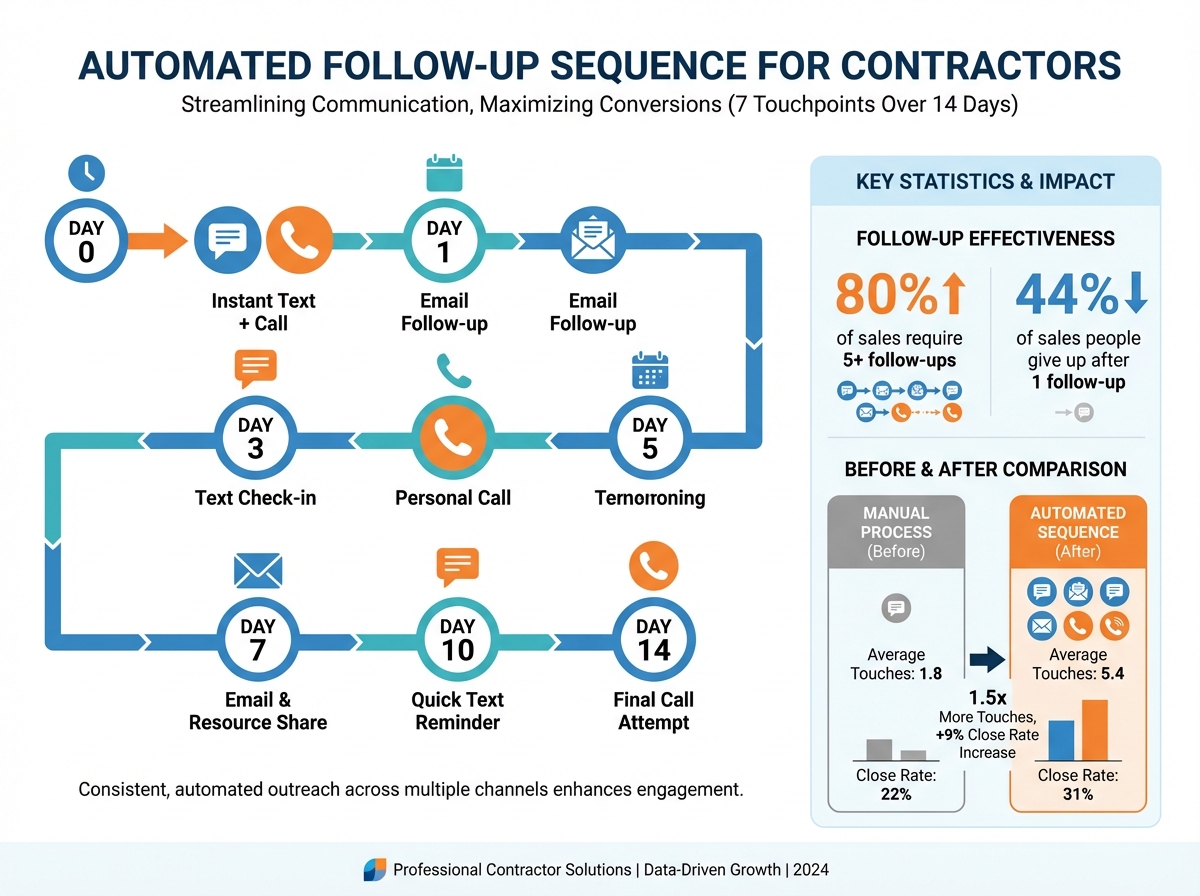
Spacing guidelines:
| Attempt | Timing | Channel |
|---|---|---|
| 1 | Immediate | Text + call |
| 2 | 2-4 hours | Call |
| 3 | Next day | |
| 4 | Day 3 | Text |
| 5 | Day 5 | Call |
| 6 | Day 7 | |
| 7 | Day 14 | Final call + text |
After 7 touches without response: Move to long-term nurture (monthly check-in).
Building Your Follow-Up Sequences
Different lead types need different sequences.
New Lead / Estimate Request Sequence
Goal: Convert inquiry to appointment.
Day 0 (immediate):
Auto-text: "Hi [Name], thanks for reaching out to [Company]!
We'll call you within 15 minutes. Need us sooner?
Call [number]."
- Immediate confirmation
- Sets expectation
- Provides direct line
Day 0 (within 15 min):
- Phone call attempt
- If no answer: voicemail + text
Day 0 text (if no answer):
"Hi [Name], this is [Tech] from [Company]. I just tried
calling about your [service] request. When's a good time
to connect? I can be reached at [number]."
Day 1:
- Second call attempt
- Email with company information
Day 1 email:
Subject: Your [service] request from [Company]

Hi [Name],

Thanks for considering [Company] for your [service] needs.
I tried reaching you yesterday and wanted to follow up.

[Brief company value prop - 2-3 sentences]

I'd love to answer any questions and schedule a convenient
time for your assessment.

Reply to this email or call me at [number].

Best,
[Name]
Day 3:
- Text reminder
Day 5:
- Third call attempt
Day 7:
- Final email with scheduling link
Day 14:
- "Checking in" text
- Move to long-term nurture if no response
Post-Estimate Sequence
Goal: Convert estimate to closed job.
Immediately after estimate:
Email with estimate attached
Text: "Just sent your [service] estimate to [email].
Any questions? Happy to walk through it. - [Name]"
Day 2:
Text: "Hi [Name], wanted to check if you had any
questions about the estimate I sent. Ready to help
when you are!"
Day 4:
- Phone call to discuss estimate
- If no answer: voicemail
Day 7:
Email: Subject: "Your [service] estimate - any questions?"

Hi [Name],

I wanted to follow up on the estimate I provided for your
[specific work]. Do you have any questions I can answer?

If timing or budget is a concern, I'm happy to discuss
options—including financing if that would help.

Let me know how you'd like to proceed.

Best,
[Name]
Day 10:
Text: "Hi [Name], still interested in moving forward
with [project]? Happy to adjust the proposal if needed.
Just let me know!"
Day 14:
- Final call attempt
- Closing email if no response
Day 14 email:
Subject: Closing out your estimate

Hi [Name],

I wanted to reach out one last time about your [project]
estimate. If now isn't the right time, I completely understand.

I'll keep your estimate on file, and you're welcome to
reach out whenever you're ready. Our pricing is honored
for 30 days.

Thanks for considering [Company].

Best,
[Name]
Maintenance Agreement Renewal Sequence
Goal: Renew expiring agreements.
60 days before expiration:
Email: Renewal reminder with benefits recap
"Your protection is ending soon..."
45 days before:
- Phone call from service manager
- Early renewal incentive offer
30 days before:
Text: "Your [Company] maintenance plan expires in 30 days.
Renew now to keep your priority scheduling and discounts.
Reply YES to renew or call [number]."
14 days before:
Email: Final renewal notice
"Don't lose your benefits..."
Urgency messaging
7 days before:
- Final call attempt
- Owner/manager reach-out for high-value customers
Day of expiration:
Text: "Your maintenance plan expired today.
Reactivate within 7 days to avoid service gaps.
Call [number] or reply RENEW."
Past Customer Reactivation Sequence
Goal: Re-engage inactive customers.
Trigger: No contact in 18+ months.
Touch 1:
Email: "It's been a while, [Name]..."

We noticed it's been over a year since we've
had the pleasure of serving you.

Is your [system type] running well? We'd love
to do a quick check-up—on us—to make sure
everything is in good shape.

[Schedule link]
Touch 2 (week 2):
Text: "Hi [Name], this is [Company]. We have
some availability for free system check-ups
this week. Interested?"
Touch 3 (week 3):
- Phone call from service manager
Touch 4 (week 4):
Email: Limited-time offer for past customers
$XX off your next service
Expiration date included
Automation Tools and Setup
Technology makes follow-up sequences possible.
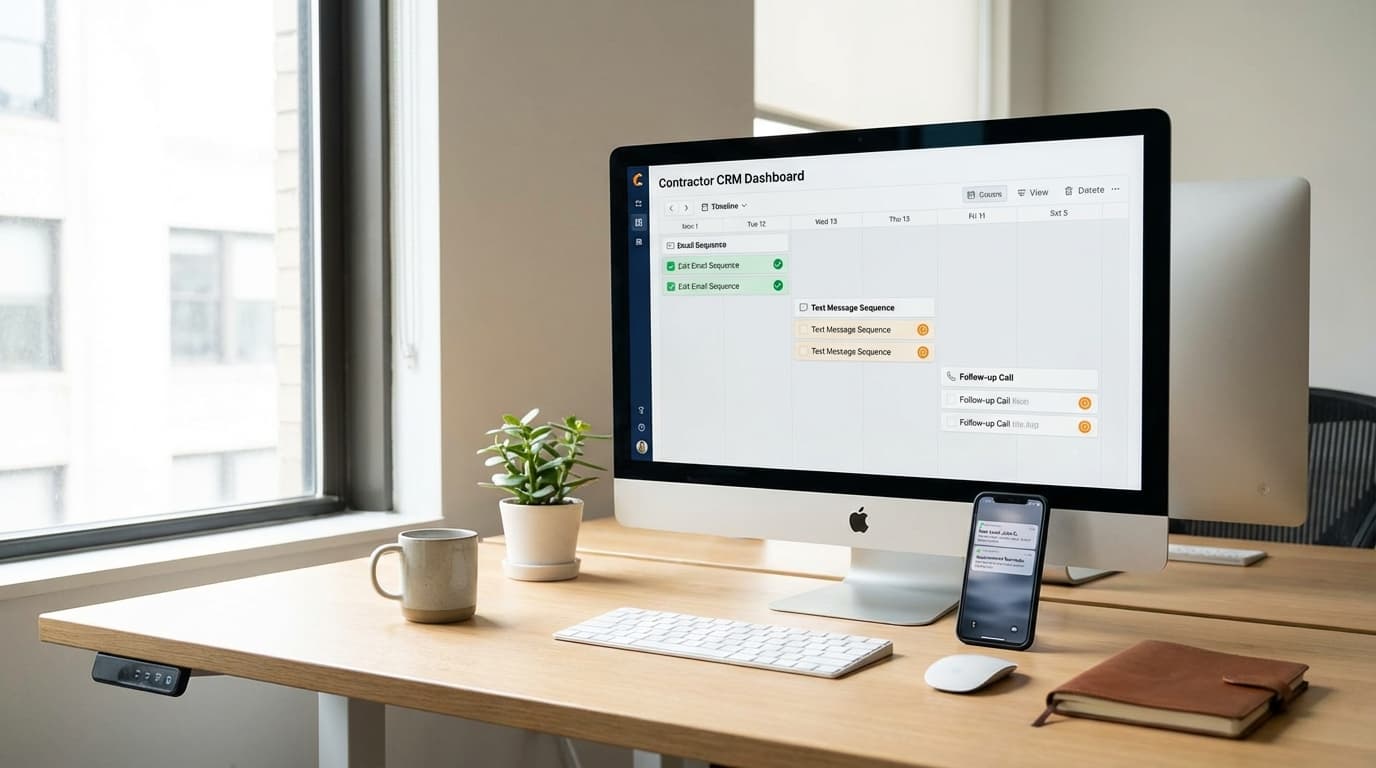
CRM-Based Automation
Requirements for your CRM:
- Automated email sending
- Text/SMS integration
- Task creation for calls
- Trigger-based workflows
- Template management
Popular options:
| CRM | Automation Capability | Best For |
|---|---|---|
| TruLine | Strong, home-service specific | Contractors |
| HubSpot | Very strong, marketing-focused | Larger teams |
| ServiceTitan | Good, operations-focused | HVAC, plumbing |
| Jobber | Basic, improving | Smaller contractors |
Email Marketing Platforms
If CRM automation is limited:
| Platform | Features | Cost |
|---|---|---|
| Mailchimp | Email automation, basic | Free-$300/mo |
| ActiveCampaign | Email + SMS, strong automation | $30-200/mo |
| Drip | E-commerce style automation | $40-150/mo |
Text/SMS Platforms
Dedicated texting tools:
| Platform | Features | Cost |
|---|---|---|
| Podium | Reviews + texting + webchat | $300-500/mo |
| Birdeye | Reviews + texting | $250-400/mo |
| SimpleTexting | SMS only, simple | $30-100/mo |
Integration Approaches
Option 1: All-in-one CRM
- Everything in one system
- Easiest to manage
- May sacrifice best-in-class features
Option 2: CRM + specialized tools
- Best features for each channel
- Requires integration (Zapier, native)
- More complex to manage
Option 3: Marketing automation + CRM
- Marketing platform handles sequences
- CRM handles records
- Clear separation of duties
Personalization at Scale
Automation shouldn't feel automated.
Dynamic Fields
Use personalization tokens:
Hi [First_Name],

Thanks for letting [Tech_Name] visit your home at
[Service_Address] yesterday.

Your [System_Type] is in [Condition], and I wanted
to follow up on the [Service_Recommended] we discussed.

The estimate of [Quote_Amount] is good through [Valid_Until].
Common personalization fields:
- First name, last name
- Service address
- Technician who visited
- System type and age
- Estimate amount
- Specific service discussed
Behavior-Based Triggers
Trigger follow-up based on actions:
| Trigger | Action |
|---|---|
| Opened estimate email | Call within 2 hours |
| Clicked financing link | Send financing details |
| Visited website after estimate | Text: "Any questions?" |
| Downloaded content | Add to nurture sequence |
Conditional Sequences
Different paths based on response:
IF responds to text → Stop sequence, mark as engaged
IF opens email but doesn't respond → Send call reminder
IF no opens after 3 emails → Switch to text-only
IF requests callback time → Schedule and confirm
IF says "not interested" → Move to long-term nurture
Measuring Follow-Up Performance
Track these metrics to optimize.
Sequence Metrics
| Metric | What It Measures | Target |
|---|---|---|
| Open rate (email) | Subject line + timing | 35-50% |
| Response rate | Message effectiveness | 10-20% |
| Contact rate | Reaching the person | 60-80% |
| Appointment rate | Sequence effectiveness | 30-50% |
| Close rate (from sequence) | Full funnel success | 20-35% |
Comparison Metrics
Before vs. after automation:
| Metric | Manual | Automated |
|---|---|---|
| Follow-up completion rate | 34% | 97% |
| Average touchpoints per lead | 1.8 | 5.4 |
| Time to first contact | 4.2 hours | 3 minutes |
| Close rate | 22% | 31% |
Optimization Testing
Test variations:
- Subject lines (A/B test)
- Text message copy
- Timing between touches
- Number of touches
- Channel sequence
Example test:
- Version A: Call → Text → Email → Call
- Version B: Text → Call → Text → Email
- Measure: Which converts more?
Common Automation Mistakes
Avoid these pitfalls.
Mistake 1: Over-Automation
Problem: Everything automated, nothing personal.
Signs:
- Customers feel like numbers
- No response to replies
- Generic, one-size-fits-all messages
Solution: Automate the reminder, personalize the response. When someone engages, a human should take over.
Mistake 2: Wrong Frequency
Too aggressive:
- Multiple touches per day
- Customer complaints
- Unsubscribes and blocks
Too passive:
- Days between touches
- Lead goes cold
- Competitor wins
Solution: Test and adjust based on response rates and complaints.
Mistake 3: No Opt-Out
Legal and practical requirement:
- Text messages need opt-out
- Emails need unsubscribe
- Ignoring requests creates liability
Solution: Clear opt-out in every message. Honor immediately.
Mistake 4: Stale Sequences
Problem: Same sequence running for years, never updated.
Issues:
- Outdated offers
- Old messaging
- Declining performance
Solution: Review and refresh sequences quarterly.
Mistake 5: No Human Handoff
Problem: Automation runs even when human should engage.
Example: Customer replies with question, next automated message sends anyway.
Solution:
- Stop automation on reply
- Alert team member
- Human takes over
Frequently Asked Questions
Won't automated messages feel impersonal?
Only if you do it poorly. Well-crafted automation with personalization, genuine value, and appropriate timing feels helpful, not robotic. The key is writing messages that sound human, using personal information appropriately, and ensuring humans take over when real dialogue begins.
How many follow-up touches are too many?
Research suggests 5-7 touches over 2-3 weeks is optimal for most contractor leads. Beyond that, move to less frequent long-term nurture (monthly). If someone explicitly asks you to stop, stop immediately. Most leads simply don't respond rather than complaining about frequency.
Should I automate phone call reminders too?
Yes—automate the reminder to make the call, not the call itself. Your CRM should create tasks for team members to call at the right times. The system ensures calls happen; humans make the actual calls.
Build Your Follow-Up Machine
Automated follow-up isn't about removing the human element—it's about ensuring the human element happens consistently. Every lead gets the attention they deserve. Every estimate gets proper follow-through. Every opportunity gets worked.
Key takeaways:
- Respond within 5 minutes for highest contact rates
- Use multi-channel sequences (text, email, phone)
- Plan 5-7 touchpoints over 2-3 weeks
- Personalize with dynamic fields and behavior triggers
- Automate reminders, but keep conversations human
- Measure and optimize continuously
The contractors who close the most business aren't necessarily better salespeople. They're more persistent. Automation makes persistence possible without burning out your team.
Ready to automate your follow-up? Start your free trial with TruLine and set up sequences that convert more leads while you sleep.