
Jobber Alternative for Contractors Who Actually Close Leads
Here's the thing about Jobber: it wasn't built for contractors who pay for leads.
You're spending $3,000 a month on Facebook ads. Your leads come in. Jobber stores them. But by the time you call back, the homeowner already hired someone else.
That's because Jobber was designed for operations. Not sales.
If you need a jobber alternative that actually converts paid leads into jobs, this comparison shows you exactly what to look for.
Why Most Contractors Pick Jobber (And Why It's Wrong for Lead Conversion)
Jobber built its name on operations. Scheduling. Invoicing. Dispatch.
Over 200,000 contractors use it. It's good at what it does.
What Jobber Does Well:
- Multi-crew scheduling without overlap
- Mobile app techs learn in 10 minutes
- QuickBooks sync that works
- Customer portal for quotes and payments
- Route planning to save drive time
But here's what nobody tells you: Jobber treats leads like paperwork.
You get a lead from Facebook. You manually enter it into Jobber. You schedule a callback. By then, your competitor already called them.
For established businesses with repeat customers, that's fine. For contractors spending money on ads, it's leaving cash on the table.
Why TruLine Built a Better Jobber Alternative for Lead Conversion
TruLine was built to solve one problem: convert paid leads before your competition.
Not scheduling. Not invoicing. Lead conversion.
How TruLine Handles Leads:
- Auto-capture from Facebook, Google, and website forms
- 60-second response with AI assistance
- Live call coaching while you're on the phone
- 30-day automated follow-up if they don't answer
- Analytics showing where leads drop off
Jobber says "add this lead to your CRM."
TruLine says "call this lead right now."
Research shows leads contacted in 5 minutes convert at 9x the rate of leads contacted after 30 minutes. TruLine tracks response time to the second. Jobber doesn't track it at all.
If you're spending $50 to $200 per lead, that difference is money in your pocket.
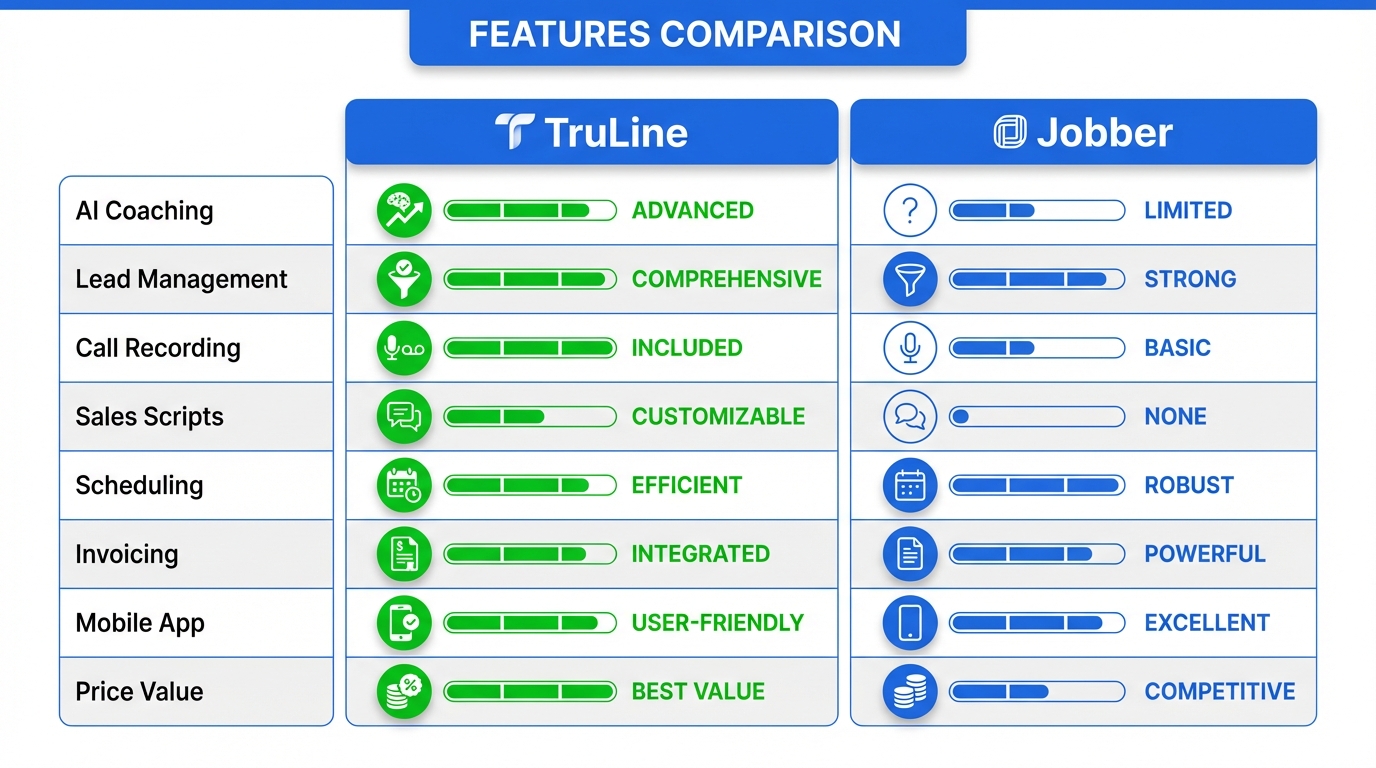
Feature Comparison: TruLine vs Jobber
Here's what you get with each platform.
| Feature | TruLine | Jobber |
|---|---|---|
| Lead Capture | Auto-capture from ads | Manual entry or Zapier |
| Response Time | Under 60 seconds with AI | Manual follow-up |
| AI Call Coaching | Real-time suggestions | None |
| Multi-Crew Scheduling | Basic calendar | Advanced routing |
| Mobile App | Lead management | Full field operations |
| Invoicing | Basic billing | Full accounting suite |
| QuickBooks Integration | Yes | Yes |
| Route Optimization | No | Yes |
| Customer Portal | Simple updates | Self-service portal |
| Analytics | Lead conversion focus | Job profitability focus |
| Starting Price | $97/month | $129/month |
The pattern is clear.
Jobber optimizes what happens after you win the job. TruLine optimizes winning the job.
Lead Management: The Real Difference Between Platforms
This is where TruLine beats Jobber by a mile.
How Jobber Handles Leads:
- Manual entry or CSV import
- Basic status tracking (quote sent, viewed, etc.)
- Email reminders to follow up
- Pipeline stages you move manually
Jobber treats leads like paperwork to process later.
How TruLine Handles Leads:
- Auto-capture with property data enrichment
- Priority scoring by conversion likelihood
- Instant notification to your phone
- AI-written script based on their situation
- Real-time coaching during the call
- 30-day automated follow-up sequence
- Analytics tied to your ad source
TruLine treats leads like money sitting on the table.
For contractors paying $50 to $200 per lead, this changes your ROI completely.
The 5-Minute Rule Nobody Talks About
Harvard Business Review found leads contacted in 5 minutes convert at 100x the rate of leads contacted after 30 minutes.
With Jobber:
- Lead comes in
- Office manager sees it
- Adds it to Jobber
- Calls when they get time
- Average response: 45 to 90 minutes
With TruLine:
- Lead comes in
- You get a notification instantly
- AI script pops up
- You call in 2 to 3 minutes
- Platform tracks this to the second
If you're buying leads, that gap is the difference between profit and loss.
Pricing: What You Actually Pay
Here's what each platform costs for a 5-person team.
Jobber Pricing (2026)
| Plan | Price | Users | What You Get |
|---|---|---|---|
| Core | $129/month | 1-2 | Basic scheduling, invoicing |
| Connect | $269/month | Up to 6 | + Client hub, QuickBooks |
| Grow | $449/month | Up to 15 | + Advanced reporting, routing |
Add $20 to $50 per tech for mobile access. Add Zapier ($30+/month) for lead capture. Add more tools for automation.
TruLine Pricing (2026)
| Plan | Price | Users | What You Get |
|---|---|---|---|
| Starter | $97/month | 1 user | Unlimited leads, basic features |
| Professional | $247/month | 5 users | + AI coaching, automation |
| Enterprise | Custom | Unlimited | + Custom integrations, analytics |
Everything included. No add-ons for lead capture or automation.
The Real ROI Math
Say you spend $3,000 per month on ads. You get 30 leads.
If TruLine improves your conversion by just 15%, that's 4 to 5 extra jobs per month.
At $2,500 average job value, that's $10,000 to $12,500 in additional revenue.
TruLine pays for itself with one extra job per month.
Which Platform Is Right for You?
It depends on where your bottleneck is.
Pick Jobber If:
- Most jobs come from repeat customers
- You need complex multi-crew scheduling
- Operations are your biggest headache
- You have 10+ employees with specialized roles
- Route planning saves you drive time
- You need full job costing and accounting
Pick TruLine If:
- You spend $1,000+ per month on ads
- Lead conversion is your growth blocker
- Response time kills your close rate
- You want AI help during sales calls
- Your team needs sales coaching
- You need to track ad ROI by source
- You're focused on growth, not just operations
Many contractors use both. TruLine for leads and sales. Jobber for operations after the job is booked. They integrate through API.
Looking at other ServiceTitan alternatives for small business? See how the full comparison breaks down.
How to Switch from Jobber to TruLine
Switching is easier than you think.
Week 1: Setup
- Export customer data from Jobber (CSV)
- Connect Facebook, Google, and website forms
- Set up team accounts
- Configure AI coaching scripts
Week 2: Training
- 2-hour AI coaching training session
- Sales reps practice with test leads
- Admin learns lead workflow
- Test integrations
Week 3: Run Both
- New leads go to TruLine
- Existing jobs stay in Jobber
- Team adapts to faster response times
- Monitor conversion improvements
Week 4+: Full Switch
- TruLine handles all new business
- Old data stays in Jobber for reference
- Measure conversion lift
- Optimize follow-up sequences
Most contractors see faster response times in week 1. Better close rates show up by day 30.
Need both platforms? TruLine integrates with Jobber through API. Leads convert in TruLine, jobs sync to Jobber for operations.
Real Contractor Examples
Here are three actual scenarios.
Established Plumbing Company
- 12 employees
- $2M revenue, 70% from referrals
- Complex emergency scheduling
Best fit: Jobber. Operations matter more than lead conversion.
Growth-Stage HVAC Contractor
- 5 employees
- Spending $4,000 per month on Google Ads
- $800K revenue, 60% from paid leads
- Struggling with response time
Best fit: TruLine. Lead conversion is the growth blocker.
Painting Contractor Scaling Up
- 8 employees
- Just started Facebook ads
- $1.2M revenue
- Transitioning from referrals to paid acquisition
Best fit: TruLine + Jobber integration. Best of both.
Your business model tells you which tool you need. Comparing GoHighLevel vs ServiceTitan or Housecall Pro vs ServiceTitan? See the full comparison page for all options.
Use Both: The Integration Option
You don't have to pick just one.
Many contractors use TruLine for sales and Jobber for operations.
How It Works:
- Lead comes in from Facebook ad
- TruLine notifies your sales rep instantly
- AI coaching helps close the call
- Job syncs to Jobber automatically
- Jobber handles scheduling and invoicing
Combined cost: $350 to $450 per month.
For contractors spending big on ads, this setup delivers the best ROI. The extra $150 per month is nothing compared to the conversion lift.
Common Questions About Switching
Can I move my data from Jobber to TruLine?
Yes. Export a CSV from Jobber. Import it into TruLine. Customer data, contacts, and notes transfer over. Job history imports as read-only records you can reference.
Does TruLine have a mobile app?
Yes, but it's focused on leads and sales. Not full field operations. Your techs can see job details and update statuses. But Jobber's mobile app is better for routing, photos, and detailed job tracking.
How does AI coaching work on calls?
TruLine listens to your call live. When the homeowner says "that's too expensive," the AI shows you a suggestion on screen: "Acknowledge price. Pivot to payment options."
It's like a sales manager whispering in your ear.
The AI learns from your successful calls. Most reps see 20% to 30% better close rates after 30 days.
Pick the Right Jobber Alternative for Your Business
Both platforms work for contractors. But they solve different problems.
Jobber optimizes operations. If scheduling, invoicing, or field management cause you headaches, Jobber fixes that.
TruLine optimizes lead conversion. If you're losing money on leads that never book, TruLine fixes that.
The best jobber alternative depends on where your bottleneck is.
For contractors running paid ads, TruLine delivers 3x to 5x ROI in the first 90 days. Better response times and AI coaching close more jobs. The platform pays for itself with one extra job per month.
Ready to test it? Start your 14-day free trial. Connect your lead sources in 10 minutes. No credit card required.
The best way to evaluate any software is with your actual leads. Import 20 to 30 leads. Watch how AI coaching and automated follow-up change your close rate.
Your leads are too valuable to waste on slow response times.